OS 26 Launcher, iLauncher Pro
- 4.5
- Rating
- 500.00K
- Installs
- Free
- Price
 Analysis by App-foxy
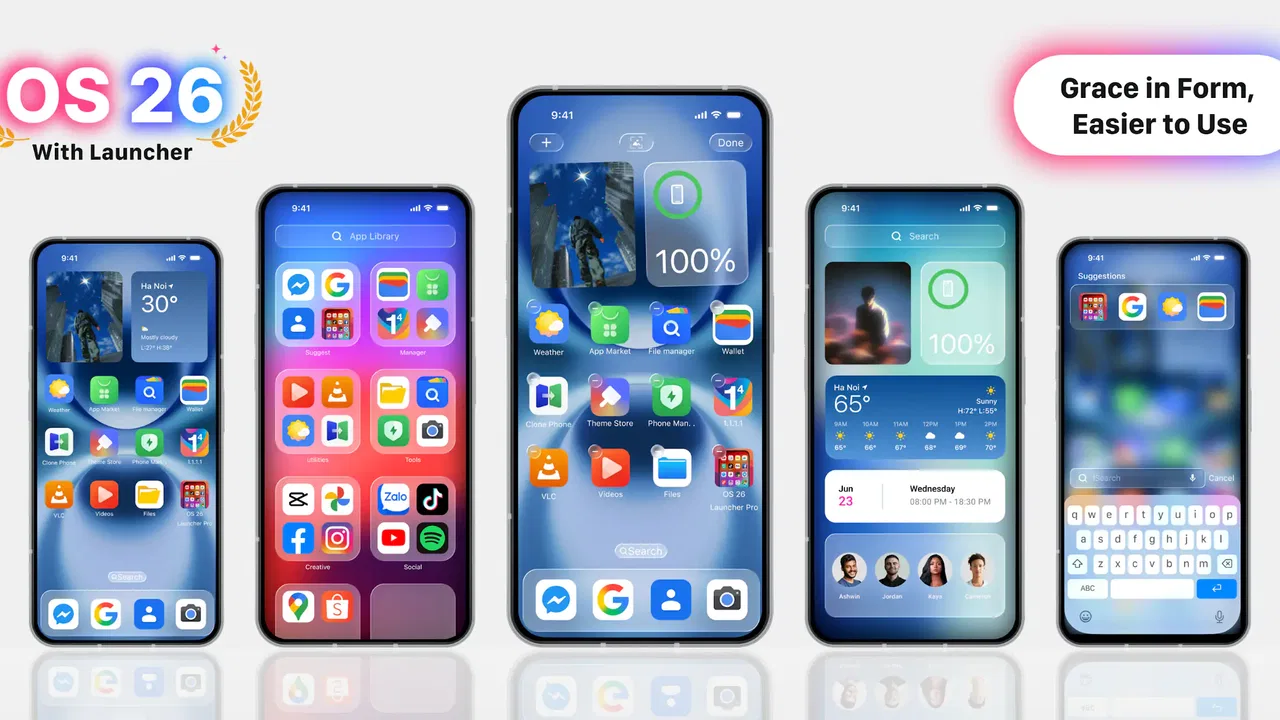
I approached OS 26 Launcher, iLauncher Pro as a personalization tool rather than a simple visual theme. Its main idea is easy to understand: give an Android phone a polished, iOS-inspired appearance while keeping the flexibility of Android underneath. After spending time with it, my view is that it works best for people who want a quick change in the way their home screen feels, but do not want to replace their phone or spend hours building a setup from separate apps.
The app comes from Launcher Software and is free to install, with optional in-app purchases ranging from $0.99 to $9.49 per item. It sits in the personalization category, carries an Everyone age rating, and supports devices running Android 6.0 or later. Its current version is 4.0.7, while the app was released on December 24, 2024. Those details matter because the launcher is aimed at a broad range of Android users, including people with older phones who may not have access to the newest system styling.
What the launcher changes in everyday use
The strongest part of the experience is the immediate visual shift. Instead of treating the home screen as a collection of unrelated widgets and shortcuts, the launcher tries to create a more unified presentation. Icons, spacing, and the general arrangement are designed to suggest the clean, controlled look many people associate with Apple’s mobile interface. I found that useful when I wanted a phone to feel less cluttered without manually redesigning every screen.
You May Also Like

 Blood Strike: 2.5 Anniversary
Blood Strike’s Loadouts Turn Every Drop Into a Tactical Gamble
A close look at Blood Strike’s custom loadouts: how fast access to signature weapons reshapes its battle royale rhythm, rewards preparation, and narrows the gap between fights.

 Pandora - Music & Podcasts
Pandora’s Music Is Easy to Start, but Harder to Recover
Pandora’s strength is its low-effort path from a seed to a station. Its weak spot is how much confidence it asks you to place in connection, setup, and quiet recovery.

 8 Ball Pool
 Is Built on Rivalries, Rematches, and Routine
A close look at the rivalries, rematches, shared routines, and unanswered safety questions that turn a quick pool match into a persistent mobile community.

 Samsung Music
’s Quiet Strength Is Playing What You Already Own
Its reach comes less from spectacle than from dependable access to a personal library. That simplicity is both the app’s strongest retention engine and its ceiling.

 AccuWeather: Weather Radar
AccuWeather Review: A Quick, Clear Forecast for Everyday Decisions
For everyday plans, the best forecast is the one you can understand quickly. AccuWeather makes rain timing, radar, and local conditions easy to act on, with a few trade-offs.

 Hill Climb Racing
Why Hill Climb Racing Still Turns Crashes Into One More Run
A tiny car, a bumpy hill and one more upgrade: Hill Climb Racing keeps resurfacing because its simple chaos makes every near-miss feel personal.
More From Our News Desk



That approach is particularly convenient for someone moving from an iPhone to Android, or for an Android owner who simply prefers the appearance of iOS. You do not need to learn a new operating system to get the visual change. The familiar Android foundation remains underneath, so the transition is mostly about presentation and navigation habits rather than relearning how the phone works.
There is also a practical benefit to using one launcher instead of assembling a similar effect from multiple customization tools. A separate icon pack, wallpaper app, widget tool, and gesture utility can produce a more tailored result, but that setup takes time and may leave small inconsistencies between screens. This launcher offers a more direct starting point. I could make a noticeable change quickly, then decide whether further adjustments were worth the effort.
Its store rating is a 4.5 average from around 10K ratings, and the app has passed 500K installs. I do not treat those figures as proof that every phone will behave identically, but they do suggest that the concept has found an audience beyond a tiny group of enthusiasts. The broad appeal makes sense: visual customization is one of the easiest ways to make an older device feel more personal.
A useful choice for a quick visual reset
One of my favorite use cases is a phone that has accumulated years of shortcuts, folders, and inconsistent icons. Reorganizing everything manually can become a small project that never gets finished. A launcher with a strong visual direction gives that phone a fresh baseline. I can remove the distractions, keep the apps I actually use close at hand, and make the device feel more intentional in a short session.
That does not mean the launcher magically solves poor organization. If the app drawer contains hundreds of unused applications, the new appearance will not remove the underlying mess. My advice is to treat the installation as a reset point: first select the launcher, then keep only the most important shortcuts on the main screen. Put work tools together, leave entertainment on another page, and avoid filling every available space just because it is there.
A second useful scenario is a shared or family phone. Some people find the standard Android interface visually busy, especially when different manufacturers add their own icons and menus. An iOS-style presentation can feel more consistent and easier to explain. It may be a good option for someone who wants a calmer home screen without changing the device’s core software.
There is a trade-off, though. The closer a launcher tries to imitate another platform, the more likely it is to feel less natural on Android. Android’s strengths include deep customization, flexible widgets, and manufacturer-specific tools. If you already enjoy those features, a more controlled iOS-inspired layout may feel restrictive rather than elegant.
Where it compares well with ordinary alternatives
The usual alternative is to keep the manufacturer’s default launcher. That is normally the safest choice for consistency with the phone’s settings, gestures, and built-in features. It also avoids the adjustment period that comes with a new home screen. For users who are satisfied with their current layout, there may be little reason to switch.
Compared with the default launcher, this app makes a stronger statement. It is not merely a small icon adjustment; it changes the visual identity of the device. That makes it more appealing when appearance is the main reason for customizing. The default option remains better for people who prioritize complete integration with the phone maker’s software.
Another alternative is a highly configurable Android launcher. Those launchers usually suit advanced users who want to control grids, gestures, icon sizes, folders, animations, and detailed behavior. They can produce a more personal result than an iOS-inspired launcher, but they also demand more decisions. I would choose that route for a carefully engineered setup. I would choose this app when I want a coherent style without turning customization into a weekend project.
Icon packs and wallpaper applications offer a third approach. They can be cheaper in terms of system change and sometimes provide more variety, but the final appearance depends on how well each piece works with the others. The benefit of an all-in-one launcher is not necessarily that every detail is superior; it is that the overall direction is easier to achieve.
Small workflow decisions that make a difference
The first practical tip I would give is to test the launcher before rebuilding the entire home screen. Keep the existing arrangement in mind, switch gradually, and check whether your most-used apps remain easy to reach. A visually attractive layout can still be frustrating if it adds extra taps to routine actions such as opening messages, checking a calendar, or starting navigation.
My second tip is to judge the launcher in more than one lighting condition. A design that looks clean in a bright room may feel too low-contrast at night, while a dark wallpaper can make icons harder to identify quickly. The point is not to chase a perfect screenshot. It is to choose a layout that remains readable when you are in a hurry.
A third tip is to keep the first page deliberately sparse. The iOS-inspired look benefits from breathing room, and a crowded screen weakens the effect. I found it more useful to place only daily essentials on the first page and leave less frequent apps in the app list or a secondary page. This also makes the launcher feel faster to use because the eye has fewer competing targets.
Finally, remember that switching launchers can affect your muscle memory. If you regularly use the phone’s original gestures or manufacturer-specific shortcuts, give yourself time to adjust before deciding whether the app is good or bad. The first impression may be dominated by unfamiliar movement rather than by the launcher’s actual visual quality.
What may frustrate you after the initial appeal
The biggest weakness is that the experience is built around imitation. If you want the exact behavior of Apple’s operating system, an Android launcher cannot fully provide that. It can change the surface and the arrangement, but it does not turn Android into iOS. Some users will appreciate the familiar look; others may find the result caught between two design philosophies.
I also think the app is less suitable for people who want maximum control. A dedicated power-user launcher is usually a better choice when fine adjustments matter more than a ready-made visual identity. With a highly customizable alternative, you can shape the interface around your habits. Here, the appeal comes from accepting a particular style rather than designing every detail from scratch.
There is also a possible cost question. The app is free, which makes it easy to try, but optional purchases are available from $0.99 to $9.49 per item. I would start with the free experience and only pay if a specific extra genuinely improves the way I use the phone. Someone who expects every customization option to be included immediately may be disappointed by the presence of paid additions.
Performance expectations should be realistic as well. A launcher sits at the center of everyday navigation, so even small delays are more noticeable than they would be in an occasional-use app. On an older or heavily loaded phone, I would pay attention to how quickly the home screen appears, how smoothly pages move, and whether returning from another app feels consistent. Android 6.0 support is helpful for compatibility, but an older operating system and older hardware can still shape the experience.
Another limitation is that a launcher cannot correct every visual inconsistency created by the phone itself. System settings, notification panels, manufacturer menus, and some application screens may continue to look different. The home screen can feel unified while the rest of the device remains a mixture of styles. That is normal for this type of tool, but it is worth knowing before installing it with the expectation of a complete system transformation.
Who should install it, and who should skip it
I would recommend trying it if your main goal is an iOS-inspired Android appearance with minimal setup. It is a good fit for people who enjoy changing wallpapers and icons but do not want to compare dozens of customization tools. It also makes sense for anyone who finds the default Android interface too busy and wants a cleaner visual starting point.
It may be especially appealing on a phone that still works well but feels visually dated. A new launcher cannot improve the camera, battery, or processor, yet it can make daily interaction feel less stale. That psychological benefit is easy to underestimate: when the screen feels organized and pleasant, routine tasks can become less irritating.
I would skip it if you are already happy with your manufacturer’s launcher, depend heavily on its special widgets, or need deep gesture and layout control. I would also avoid it if your only reason for installing it is to obtain a perfect copy of iOS. The visual resemblance is the point, but the underlying Android behavior remains important.
For privacy- or permission-conscious users, my practical advice is to review the access requests shown during setup and keep the launcher only if they make sense for the way you plan to use it. A home-screen replacement is a central part of the phone, so it deserves more attention than a wallpaper that can be removed in seconds. If the setup feels uncomfortable, the default launcher is the simpler fallback.
My verdict after using it as a daily customization
OS 26 Launcher, iLauncher Pro succeeds because it has a clear purpose. It does not ask the user to invent a design from a blank canvas; it offers a recognizable iOS-inspired direction and makes Android feel more polished with less effort. That clarity is its strongest evidence of good design. I could understand who it was for almost immediately, and the app’s free entry point makes experimentation straightforward.
At the same time, the clear purpose is also its boundary. This is not the right tool for someone who wants every part of Android exposed for detailed adjustment, nor is it a substitute for Apple’s actual software. Its value depends on whether you like the chosen style and whether that style fits the way you reach your apps each day.
My final recommendation is positive, with a condition: install it for the visual refresh, not for a total operating-system conversion. Start with a sparse home screen, test your normal routines, and resist paying for extras until you know the free setup suits you. For users who want a smoother-looking, iOS-inspired Android home screen without a complicated customization project, this is a convincing option. For power users and people already satisfied with their default interface, staying with the built-in launcher or choosing a more configurable alternative will probably be the better decision.
FAQs for OS 26 Launcher, iLauncher Pro
01What features does OS 26 Launcher, iLauncher Pro offer?
OS 26 Launcher, iLauncher Pro brings a sleek and modern interface inspired by the latest OS designs. It features customizable home screens, a variety of themes, app icon packs, and smart widgets. Users can enjoy a smooth transition effect, a quick search function, and a built-in app manager to enhance overall device performance.
02Is OS 26 Launcher, iLauncher Pro compatible with all Android devices?
OS 26 Launcher, iLauncher Pro is designed to work on most Android devices running Android 5.0 and above. However, performance may vary depending on the device's specifications and capabilities. It’s recommended to check your device’s compatibility in the app store before downloading to ensure optimal performance.
03Does OS 26 Launcher, iLauncher Pro affect battery life?
Like most launchers, OS 26 Launcher, iLauncher Pro can have an impact on battery life. However, it is optimized to minimize battery consumption while providing a smooth and efficient user experience. Users can manage settings to further reduce power usage, such as limiting background processes and animations.
04Are there in-app purchases in OS 26 Launcher, iLauncher Pro?
Yes, OS 26 Launcher, iLauncher Pro offers in-app purchases. While the basic version is free, users can access premium features such as exclusive themes, additional icon packs, and advanced customization options through in-app purchases. These purchases enhance the user experience by unlocking all the app’s capabilities.
05How user-friendly is OS 26 Launcher, iLauncher Pro for new users?
OS 26 Launcher, iLauncher Pro is designed with user-friendliness in mind, making it suitable for both new and experienced users. The app provides a simple setup process and intuitive navigation. It includes a helpful tutorial for first-time users to easily understand and customize the launcher according to their preferences.
Pros
- Smooth and responsive user interface.
- Highly customizable home screen layout.
- Minimal battery consumption.
- Supports a wide range of themes.
- Quick access to frequently used apps.
Cons
- Some features require in-app purchases.
- Limited widget support compared to stock launchers.
- Occasional ads in free version.
- May not support older device models.
- Customization can be overwhelming for beginners.

OS 26 Launcher, iLauncher Pro
Gallery